Keyboard, shortcuts, and Autohotkey
07/10/2305/10/23
A keyboard is useful, like, for typing this very text. But sometimes it's incredibly frustrating, for example when you need to type in another language, or need any special characters, or need to type the same thing often. There is a small software which does exactly these types of things: Autohotkey.
Hotkeys
Autohotkey is a scripting language and software, which simply means that you write a small text in a .ahk file and then execute it. So the first thing is obviously downloading it (unfortunatley it only works on Windows). Then, we can create our first script with the simpler and most useful feature: hotkeys. We need to create a .ahk file (or create a text file and rename it something like myscript.ahk). Then we need to edit it by right clicking it, open with, and selecting a text editor like WordPad. We don't double click it because it will execute the script.
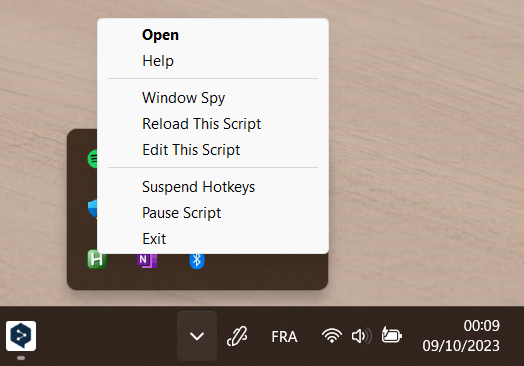
To set up a hotkey the syntax is hotkey::result. For example if you want to type ¥ when pressing Alt+Y, the script is !Y::¥. You see that Alt is the ! symbol, and it's the same for other "Modifiers key" which you can find on the autohotkey documentation. After writing this you can save the file, executing it by double click, and test it. The script runs in the background and you can manage it there:
I personally use Hotkeys to write the Eszett (ß). I chose a shortcut which is not used by any software, AltGr+s, and used it to write ß with this script <^>!s::ß.
Hotstrings
Hotstrings are chains of characters that are replaced when you type them. For example I never write my e-mail address, I just have to type !!e and it'll type my e-mail address thanks to this script : :*:!!m::eloi.example@s2023.tu-chemnitz.de. You can see similarities with Hotkeys, the syntax is just a bit different, :options:text to overwrite::text to type. The most common options are * which replace you text immediately without having to press space or enter, and ? which will replaces your chain even when it's inside another word (for example if your hotstring replace "pt" by "point", typing "abrupt" will result in "abrupoint"). You can find more info on Hotstrings in the documentation page.
Auto start
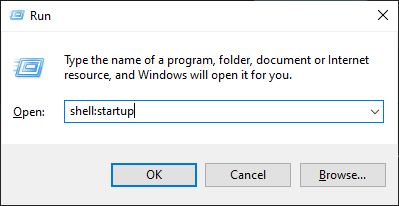
We saw that to execute a script we must double click it. If you want your script to be launched on Windows startup, you simply have to move your .ahk file in the startup folder. To quickly access it press Win+R, type shell:startup and past you file.
To go further
Autohotkey is a much more powerful software than that. If you want to, I highly recommend reading the documentation and searching articles that show you examples of the great things you can do with it.
Personally, I use it for many things, here is a smaller version of my file:
									;Remap

									<^>!o::ø

									<^>!s::ß


									;One letter hotstrings:

									:*?:!!2::

									    Clipboard := "²"

									    Send ^v

									    return

									:*:!!b::Bonjour,{Enter}{Enter}{Enter}{Enter}Cordialement,{Enter}{Enter}Eloi Donval{Up}{Up}{Up}{Up} ;to write emails

									:*:!!e::eloi.example@etu.esisar.grenoble-inp.fr

									:*:!!h::Hello,{Enter}{Enter}{Enter}{Enter}Best regards,{Enter}{Enter}Eloi Donval{Up}{Up}{Up}{Up} ;to write emails

									:*:!!l::console.log();{Left}{Left}

									:*:!!m::eloi.example@s2023.tu-chemnitz.de

									:?*:!!o::Ω

									:*:!!p::printf("\n");{Left}{Left}{Left}{Left}{Left}

									:?*:!!s::System.out.println();{Left}{Left}

									:*:!!t:: ; to start a LaTeX file

										FileRead, FileContent, C:/Users/donva/Desktop/Projets/ressources_LaTeX/template.tex

										Clipboard := FileContent

										SendInput ^v {Up}{Up}{Up}{Up}{Up}{Left}

										return

									:*:!!"::«  »{Left}{Left} ;french quotation mark


									;short for words / abbreviations

									:c:ee ::乇ノ๑ʅรعɐʊ	;case sensitive, e+e+[espace]+[espace]

									:*:ppv::PoulpyVroum


									;Correction of words

									:*:cansat::CanSat

									:,*:freertos::FreeRTOS

									:?*:ghz::GHz

									:*:javascript::JavaScript

									:*:latex::LaTeX

									:*:linkedin::LinkedIn

									:*:poulpysat::PoulpySat

									:*:poulpyvroum::PoulpyVroum

									:?*:etre::être

									:?*:heuresement::heureusement

									::tache::tâche

									::taches::tâches


									; to type special caracter by altcodes (it goes to 255 in my original file)

									:?:alt1::☺

									:?:alt2::☻

									:?:alt3::♥

									:?:alt4::♦

									:?:alt5::♣

									:?:alt6::♠

									:?:alt7::•

									:?:alt8::◘

									:?:alt9::○

									:?:alt10::◙
To conclude, here are some interesting examples of what you can achieve with Autohotkey:
- Show/hide known extensions, or hidden files, in the windows explorer
- Do a quick search on you browser with a single shortcut
- Open your favorite folder with a shortcut
- Use your arrows as a mouse
- launch your favorite software with a shortcut
- Manage your volume with two keys or shorcuts
- Autocorrect these words you always spell wrong
- Make a window always stay on top
- ...